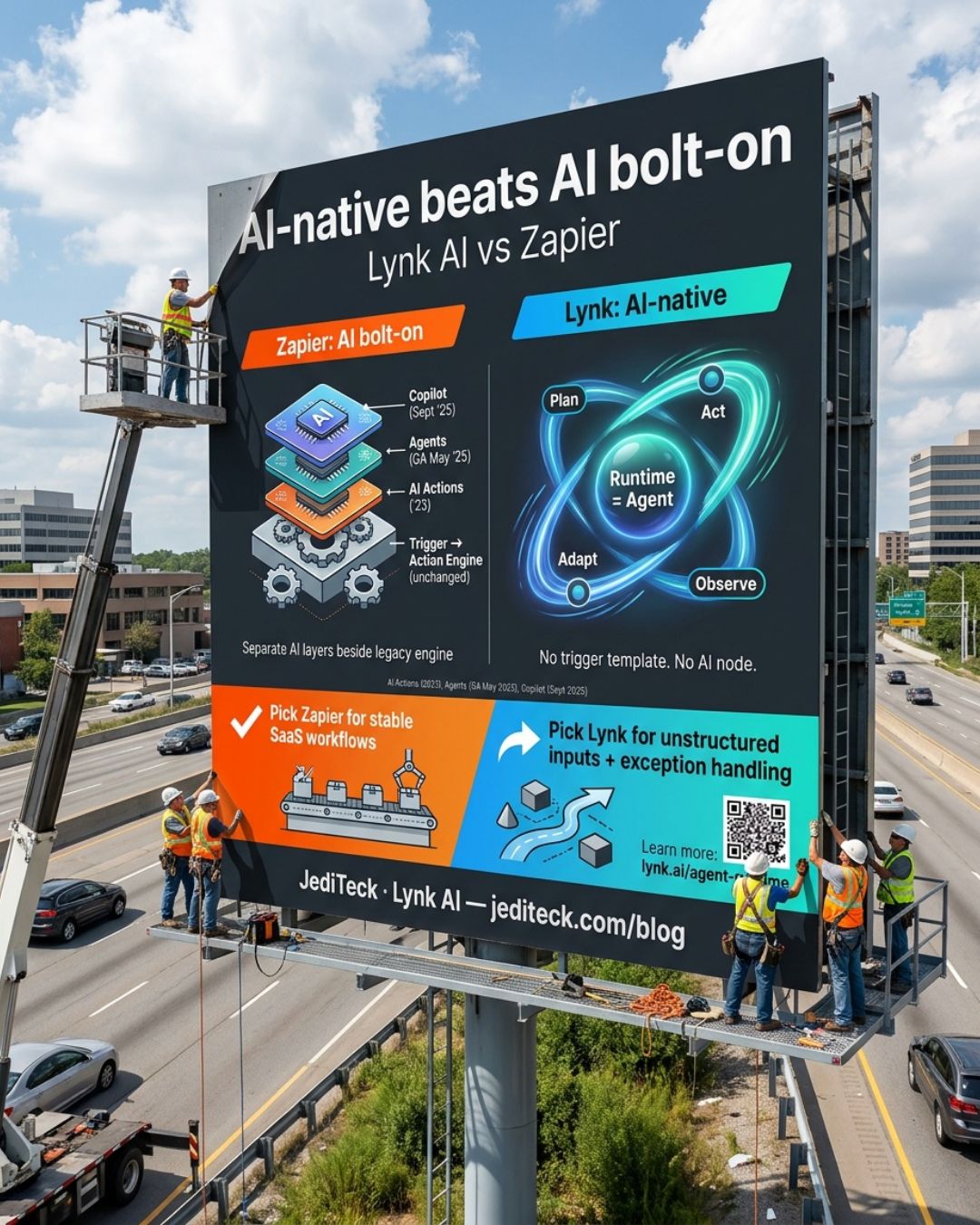
Lynk AI vs Zapier: AI-Native Beats AI Bolt-On
TL;DR: AI-native vs AI bolt-on
Zapier spent a decade building the largest trigger-action automation engine in the market — and until 2025, AI wasn't part of that engine at all. In May 2025, it released Agents as a separate product with its own subscription. Then in September 2025, Copilot arrived as a natural language sidebar assistant. Neither changed the engine underneath. Lynk AI is AI-native by design — built from the start around an agent that reads inputs and decides what to do, not a module placed beside the engine. For predictable, stable workflows between well-supported SaaS apps, Zapier is fast to configure and proven at scale. When the work involves unstructured inputs or decisions that branch mid-execution, the architectural gap becomes the constraint.
Where Zapier shines
Zapier's connector library is the standout asset. The platform supports 7,000+ apps and 30,000+ actions as of mid-2026 — the broadest coverage in the trigger-action automation space. If an app is on the list, the integration typically works without custom code.
Non-developers can get a workflow live in under an hour. The trigger-action model is intuitive: something happens, something else follows. That clarity matters for teams without engineering resources. Zapier's enterprise tier adds role-based access, audit logging, and SSO — governance requirements most security teams need before approving a new tool. The platform's decade-long install base comes with extensive community documentation and a large library of pre-built templates for common use cases.
How Zapier added AI
Zapier has shipped three distinct AI products in three years. AI Actions launched in 2023, adding the ability to call language models as a single step inside an existing Zap. Zapier Agents entered beta in mid-2024 and reached general availability in May 2025 — a separate product, priced separately, built for autonomous multi-step task execution. Zapier Copilot arrived in September 2025 as a natural language assistant for building Zaps faster.
Agents requires its own subscription, separate from the core Zapier plan. Copilot lives in a sidebar. The original trigger-action engine is what it's always been — Agents and Copilot are features layered on top, not a rewrite of the runtime underneath.
Where Zapier runs out of road
Complex branching is the most common pain point on G2. The trigger-action model handles 'if A then B' reliably; when logic requires iterating over a dynamic set or recovering from an unanticipated branch, it stalls and someone intervenes manually.
Unstructured inputs are the second hard limit. A vendor invoice that doesn't follow a template, an email body with variable content — Zapier needs extraction and cleanup steps before it can act. Each format change downstream means Zap maintenance.
Pricing stacks fast. Agents and Copilot carry separate subscriptions on top of the core plan. Task-based billing catches teams off guard when AI steps run at volume: 2026 reviews report monthly costs between $1,000 and $3,500 for heavy AI users. Zapier's Trustpilot score sits at 1.4/5.
What "AI-native" means in Lynk
Lynk AI doesn't have an AI node. The agent is the runtime.
When a workflow starts — triggered by an inbound email or a webhook — the agent reads the input and decides what to do. No trigger template required. No pre-defined action sequence. If an email arrives in a format you didn't anticipate, the agent reads it and adapts. If an exception surfaces mid-workflow — a vendor replies with a question instead of an approval — the agent handles that branch without a fallback Zap.
There is no AI/automation boundary to cross. The agent and the automation engine are the same system.
The bolt-on tax
When AI is a separate layer, every workflow that requires reasoning pays a crossing cost.
In Zapier, the extraction step and the AI Actions decision call are separate Zap steps — each boundary between them a hand-off point where schema changes and error states accumulate. Build enough of these chains and the pipeline becomes fragile.
The fragility compounds over time. Stable workflows stay stable. When input shapes drift — a vendor switches invoice formats, a customer fills out a form differently — the Zap breaks and someone fixes it manually. Lynk handles that adaptation at the reasoning layer. No workflow rebuild needed.
Where Zapier still wins
Zapier is the right pick for a specific buyer, and that's worth stating directly.
Teams running stable workflows between major SaaS apps — Salesforce to Slack, HubSpot to Google Sheets — get real value from Zapier without hitting its limits. When inputs are structured, triggers are predictable, and the job is moving data rather than interpreting it, the trigger-action model is efficient and low maintenance.
Small teams without engineering resources benefit from Zapier's setup speed. Getting a workflow live in under an hour, without writing code, solves a real problem when the use case is simple. The connector breadth is unmatched for common SaaS pairings, and the template library shortens time-to-value.
Decision guide
The right tool depends on your workflow type and input complexity.
Pick Zapier if:
- Your workflows connect well-supported SaaS apps on stable, predictable triggers and actions
- You need to move structured data between systems with minimal branching or decision logic
- Your team values fast, no-code setup and a connector library that covers most standard SaaS pairings
Pick Lynk if:
- Your workflows involve unstructured inputs — emails, PDFs, or forms that vary by customer or vendor
- Exception handling needs to happen automatically, without someone manually repairing a broken workflow
- Your automations require decisions across multiple systems, not just moving data from one to another